Tailoring Your Alert Configurations: Everything to Consider
Learn how to configure dropping odds alerts effectively. Discover how filters work, what to consider when setting them, and how to optimize your alert-to-bet ratio for maximum value betting opportunities.
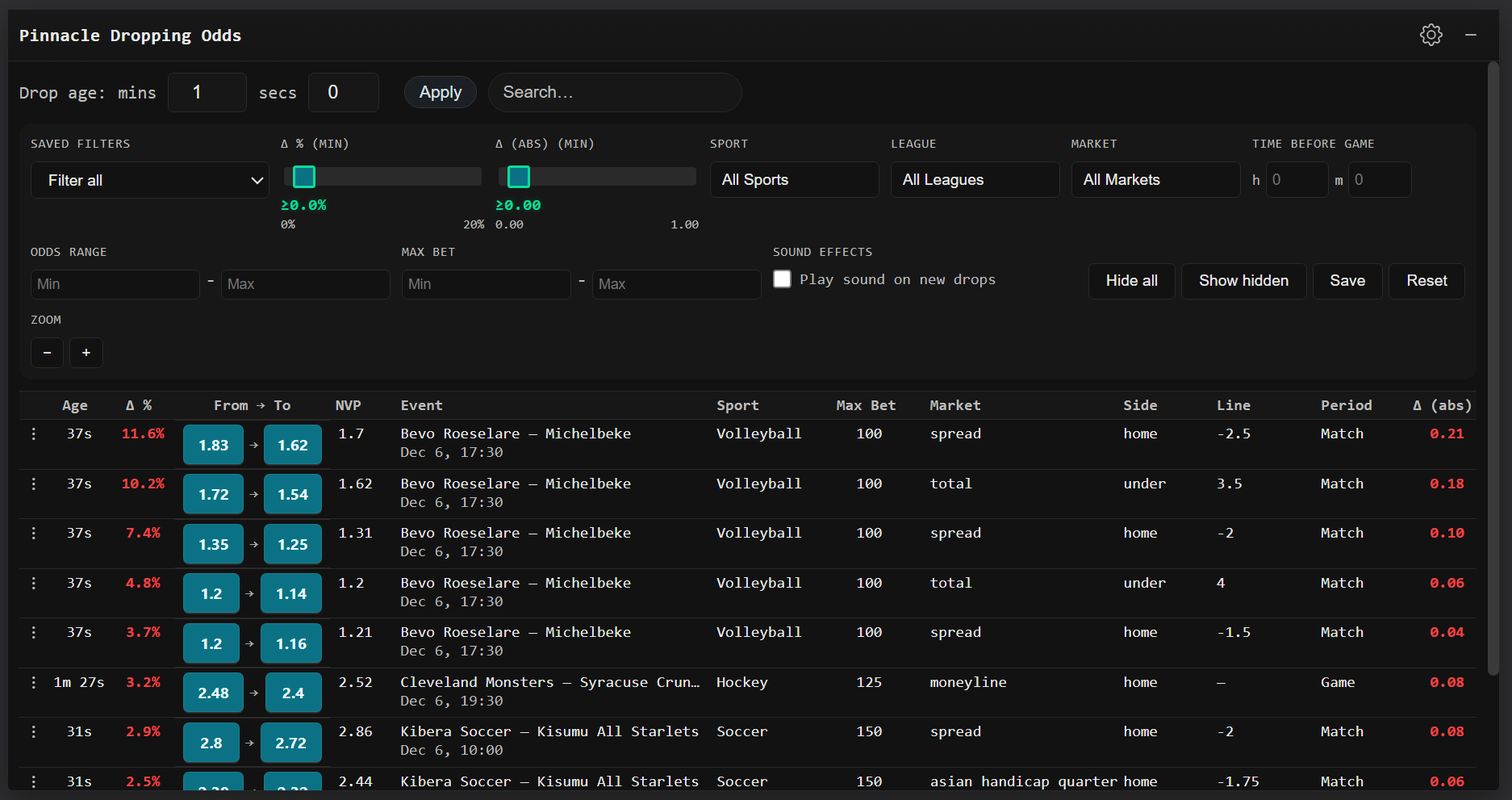
Setting up your dropping odds alerts correctly is essential for successful value betting. Proper configuration helps you receive actionable alerts that lead to profitable bets, while poor setup can overwhelm you with useless notifications or cause you to miss valuable opportunities.
This guide covers everything you need to know about configuring your alerts, from understanding how filters function to optimizing them for your specific situation.
No Perfect Configuration
There's no universal configuration that works perfectly for everyone. What works for me might look very different from what works for you.
Your configuration should reflect your personal circumstances, including your risk tolerance, which bookmakers you can access, and your turnover objectives. These factors, among others, will determine how you set up your alerts.
Don't blindly copy someone else's configuration—think about your own needs and adjust accordingly.
Trial and Error
The best way to discover your optimal configuration is through experimentation. Whether you're just starting out or you're an experienced bettor, I strongly recommend regularly testing new configurations.
Here's the approach: set up a configuration, identify what you like about it (perhaps you're catching really significant drops), then identify what you don't like (perhaps you're not receiving enough alerts to maintain high turnover). Make the necessary adjustments and repeat this cycle.
Keep refining your configuration until it matches your needs. Remember that your needs may change over time, so revisit your settings periodically.
For more information on managing variance and turnover, see our variance in sports betting guide.
Filters
Filters determine what alerts you receive. Depending on how you configure them, you might get many alerts or few alerts, large drops or small drops, alerts for efficient markets or inefficient markets.
You must understand how different filters affect alerting and how to set them to ensure you receive alerts that are actionable for your situation.
In this section, I'll explain how each filter works, important considerations when setting them, and what to think about for each filter. Remember there's no 'perfect' way to set filters—your needs differ from mine. However, some general guidelines can be helpful.
Time Interval Filter (Drop Age)
The time interval filter determines the period across which the system scans for market drops. This is also called "drop age" in the interface.
You can set the interval using minutes and seconds. For example, setting it to 1 minute and 0 seconds means the system compares current odds to odds from one minute ago.
Shorter intervals (30 seconds to 2 minutes) catch sudden drops caused by new information entering the market. Longer intervals (3-10 minutes) catch more gradual, systemic drops.
The default setting is 1 minute, which works well for most situations. Adjust based on whether you want to catch quick market movements or more sustained trends.
Search Filter
The search filter allows you to quickly find specific events, teams, leagues, or markets by typing keywords.
Search is case-insensitive and matches across event names, team names, league names, markets, sides, and lines. For example, searching for "Liverpool" will show all drops related to Liverpool matches.
You can use multiple search terms separated by spaces to narrow results further.
Saved Filters
The saved filters dropdown lets you save and quickly load your favorite filter configurations.
After setting up filters that work well for you, click "Save" to store them with a custom name. You can then quickly switch between different filter setups using the dropdown.
This is especially useful if you want different configurations for different sports, times of day, or betting strategies.
Sport Filter
The sport filter allows you to select which sports you want to receive alerts for.
Available sports include American Football, Baseball, Basketball, Cricket, E Sports, Handball, Hockey, Mixed Martial Arts, Soccer, Tennis, and Volleyball.
You can select multiple sports or leave it set to "All Sports" to receive alerts across all sports. Selecting specific sports helps focus your attention on markets you're most familiar with.
League Filter
The league filter lets you filter alerts by specific leagues or competitions.
Available leagues are dynamically populated based on the current data. You can select multiple leagues or leave it set to "All Leagues".
This is useful if you want to focus on specific competitions where you have better knowledge or where your soft bookmakers offer better coverage.
Market Filter
The market filter allows you to select which types of betting markets you want alerts for.
Available markets include Moneyline, Spread, Total, Team Total, Asian Handicap, Asian Handicap Quarter, Asian Total, and others.
You can select multiple markets or leave it set to "All Markets". Focusing on specific markets can help you specialize and improve your alert-to-bet ratio.
Minimum Drop Percentage Filter
The minimum drop percentage filter determines how large an odds drop must be before you receive an alert.
Inefficient Markets = Big Min Drop %
If you're being alerted about low limit and high vig markets, the drop needs to be bigger because you want a larger margin of safety when placing a bet at your soft bookmaker to compensate for the inefficiency of the sharp bookmaker's pricing.
You need the price difference between the sharp bookmaker and the soft bookmaker to be larger than if you were betting into a high limit and low vig market.
The way you find bigger discrepancies is by catching larger drops, so if your strategy includes betting into inefficient markets, consider a relatively high minimum drop percentage—perhaps 10% would be a good starting point.
For more information on market efficiency, see our Pinnacle dropping odds manual.
Quality vs Quantity
The higher the minimum drop percentage, the fewer alerts you will receive. Striking the balance between quality and quantity is the goal when configuring your alerts.
I recommend trying out different minimum drop percentages until you hit the sweet spot. If your turnover is low and you want to increase it, you can consider lowering your minimum drop percentage, but do this with caution.
Never get to the point where you're placing negative EV bets because you're chasing high turnover. Quality should always take precedence over quantity.
Time Before Game Filter
The time before game filter shows only events starting within a specified time window.
You can set this using hours and minutes. For example, setting it to 2 hours means you'll only see alerts for matches starting within the next 2 hours.
This filter helps you focus on matches that are starting soon, which can increase turnover since your capital is locked up for shorter periods. However, be aware that some bookmakers take markets offline within 5-10 minutes of kickoff.
Leave both fields empty to see alerts for all upcoming matches regardless of start time.
Sound Effects
The sound effects toggle allows you to enable or disable audio notifications when new drops appear.
When enabled, you'll hear a sound alert whenever a new drop matching your filters appears in the list. This helps you catch opportunities quickly without constantly watching the screen.
Sound alerts are throttled to prevent overwhelming you with notifications if multiple drops appear simultaneously.
Delta Percentage (Δ %) Filter
The delta percentage filter (Δ % min) determines the minimum percentage change in odds required before you receive an alert.
This filter uses a slider ranging from 0% to 20%. Higher values mean you'll only see more significant market movements, resulting in fewer but potentially higher-quality alerts.
For inefficient markets (low limit, high vig), you may want a higher minimum drop percentage (around 10%) to ensure a larger margin of safety. For more efficient markets, lower percentages (3-5%) can work well.
The default is 0%, which shows all drops. Adjust based on your quality vs quantity preferences.
Delta Absolute (Δ abs) Filter
The delta absolute filter (Δ abs min) filters by the absolute decimal change in odds, regardless of percentage.
This filter is useful for catching meaningful moves at short prices where percentage changes are small. For example, a drop from 2.00 to 1.92 represents a 4% change, but the absolute change is 0.08.
The slider ranges from 0.00 to 1.00. Setting it to 0.08 means you'll only see drops where the odds decreased by at least 0.08 in decimal terms.
This complements the percentage filter and helps ensure you don't miss valuable opportunities at shorter odds.
Odds Range Filter
The odds range filter allows you to specify minimum and maximum odds values for alerts.
You can set both a minimum and maximum odds value. Only drops where the current odds (after the drop) fall within this range will trigger alerts.
Variance Considerations
Higher odds lead to more variance and longer losing streaks. Filtering to shorter odds (e.g., 1.50-2.50) can reduce variance and make your results more consistent, though you may miss some high-value opportunities.
For more information on managing variance, see our variance in sports betting guide.
Max Bet Filter
The max bet filter filters alerts based on the maximum bet size the sharp bookmaker will accept at the current price.
You can set both minimum and maximum max bet values. This helps you focus on markets where the sharp bookmaker has sufficient confidence in their pricing.
Higher limits generally indicate more efficient markets, but constraining yourself to only high-limit markets can significantly reduce your alert volume and turnover. Soft bookmakers also adjust to high-limit market drops more quickly.
Consider using the margin of safety principle when betting into lower-limit markets to compensate for potential pricing inefficiencies.
Action Buttons
The filter bar includes several action buttons to help you manage your alerts:
- Hide all - Marks all currently visible rows as hidden, removing them from your view
- Show hidden - Restores all previously hidden rows back into view
- Save - Saves your current filter configuration with a custom name for quick access later
- Reset - Resets all filters back to their default values
These buttons help you manage your workflow and quickly switch between different filter setups.
Zoom Controls
The zoom controls allow you to adjust the size of the table display.
Use the "+" button to make the table larger and the "−" button to make it smaller. This helps you customize the view to your screen size and preferences.
Your zoom preference is saved and will persist across sessions.
Ready to configure your alerts effectively? Use FairOdds Terminal to set up custom alert configurations and optimize your dropping odds strategy across hundreds of bookmakers.
Alert Configuration FAQ
Is there a perfect alert configuration?
No, there is no perfect configuration that works for everyone. Your volatility tolerance, bookmaker availability, and turnover ambitions will dictate how you set your configurations. What works for one person might not work for another.
How do I find the best alert configuration for me?
Trial and error is the best way to figure out what works best for you. Set up a configuration, identify what you like and don't like about it, then make adjustments. Keep repeating this process until you have a configuration that meets your needs.
What is the minimum drop percentage filter?
The minimum drop percentage filter determines how large an odds drop must be before you receive an alert. Higher percentages mean fewer alerts but potentially better quality. Lower percentages mean more alerts but you'll need to filter through more opportunities.
How does the time interval filter work?
The time interval is the period across which the system scans for market drops. For example, if set to three minutes, it compares current odds to odds from three minutes ago. Shorter intervals catch sudden drops, while longer intervals catch more gradual, systemic drops.
Should I focus on markets close to match start?
Markets closer to match start are generally more efficient, but you can still bet on less efficient markets using the margin of safety principle. Focusing on matches close to start can increase turnover since your capital is locked up for shorter periods.